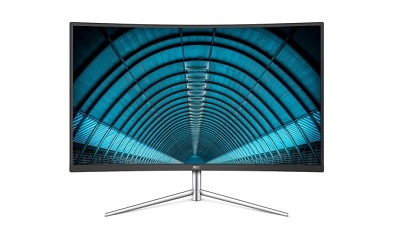
 AOC monitors are a favorite of mine. While they may not be the top of the line, these reliable displays offer a lot of "bang for your buck." In other words, they are budget-friendly, allowing you to save money. If you are a system builder, you know that money saved on a display can be used towards PC components, such as RAM, storage, etc. If you want one of those fancy new curved monitors, today, AOC launches a new model. The C32V1Q, as it is called, features a 32-inch screen. While a big display is appreciated, please know, the resolution is just 1080p. While that should be OK for gaming, you might experience blurry text during general use. Personally, I don't like to exceed 24-inch with 1080p, but ultimately, the consumer needs to make that decision. "The C32V1Q is AOC’s newest curved monitor. The monitor features a minimalistic well-built design with a glossy black body, metallic silver finish and sleek curves. The curved ultra-slim frameless design is perfect for multi-display viewing and enables seamless multi-monitor setups designed to boost productivity. The borderless display offers a detailed 1920x1080 resolution and 60Hz refresh rate. The VA panel has viewing angles of 178 degrees, allowing users to enjoy consistent color uniformity and accuracy at all angles. The display also has a 20M:1 dynamic contrast with a 4ms response time, and features several different inputs, including one VGA, one DisplayPort and one HDMI for connectivity of all users’ high-quality digital video and audio devices," says AOC. We have more including price posted on OUR FORUM.  Windows 10 UWP bug allowed full file system access without asking permission. A report by BleepingComputer has shed light on a Windows 10 bug that granted certain Universal Windows Platform (UWP) apps full access to a device’s file system, a great deal more than the expected limited file access. UWP apps are allowed to request this extra access, however, they are expected to explain to Microsoft what the access will be used for when submitting the app to the store. UWP apps that use this extra access are also supposed to prompt a settings screen with the ability to enable this access when the app is first used. Unfortunately, this screen wasn’t being prompted correctly and it doesn’t appear as if Microsoft is being that strict with app developers submitting such apps to the store. This settings prompt bug has apparently been fixed in the Window 10 October 2018 update though that update has been delayed due to some other, unrelated, bugs. You can read more about the nitty-gritty of this issue, and view some code samples, over on BleepingComputer.  No matter how robust an operating system is, it is difficult for it to be completely free of possible threats. Given that cybercriminals are constantly reinventing themselves, it follows that the same goes for cyberthreats. It is a constant cycle where any delay or slip up can open up new points of entry for unwanted visitors. And if operating systems are vulnerable, the companies using them are also vulnerable. In many cases, companies entrust their corporate cybersecurity to a single piece of default software; but experience shows that this is not enough. We now yet more proof of this. And what’s more, it affects a huge number of companies all over the world. Read more: If your company uses Windows 10, watch out: there are new vulnerabilities about |
Latest Articles
|