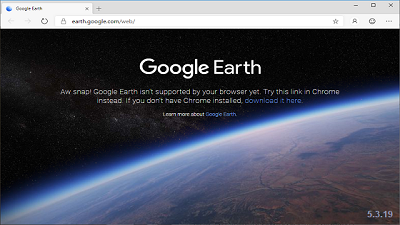
 Chromium-based Microsoft Edge users who try to use Google Earth are welcomed by an error message and a link directing them to download Google's Chrome web browser. This might be a surprise for some given that the new Edge uses the same HTML engine as Chrome and that, after 12 years of being a cross-platform desktop application, Google Earth has been converted into a web app which should allow users to "explore worldwide satellite imagery and 3D buildings and terrain for hundreds of cities," according to its website. At the moment though, when users try to launch the Google Earth web app in Microsoft's new Chromium Edge, they get the following error: "Aw snap! Google Earth isn't supported by your browser yet. Try this link in Chrome instead. If you don't have Chrome installed, download it here. Learn more about Google Earth." As Microsoft Edge Product Manager Eric Lawrence explained in a Twitter thread following user reports the issue stems from the fact that the Chromium-based Edge browser does not ship with the Portable Native Client (PNaCl) component, the architecture-independent version of Native Client (NaCl) which was used by Google when converting Earth into a web app during 2017. Google updated its company-wide UA sniffer code last week to recognize Chromium-based Edge as its own browser instead of lumping it in with "Chrome." Some Google products have an explicit allow-list of supported browsers, and those products didn't all update their allow list to say "Oh, and new Edge is fine too." Get better informed by visiting OUR FORUM.  A publicly accessible Elasticsearch database discovered on March 27 exposed various types of personally identifiable information (PII) and medical info of more than 100,000 individuals. Security Discovery's researcher Jeremiah Fowler who discovered the unprotected Elasticsearch database found out after further investigation that the leaked data belonged to SkyMed, a company which provides medical emergency evacuation services for about 30 years. As the researcher says, the Elastic database was "set to open and visible in any browser (publicly accessible) and anyone could edit, download, or even delete data without administrative credentials." The database contained 136,995 records of SkyMed members and included PII data such as full names, addresses, dates of birth, email addresses, phone numbers, with some of the entries also including medical information. Besides finding hundreds of thousands of leaked member records, Fowler also discovered that the company's network might have also been infected at some point in time with an unknown ransomware strain. This was revealed when the researcher found a ransom note entry named "howtogetmydataback" in SkyMed's unsecured ElasticSearch database. While the company did not provide any feedback to the researcher's reports on the exposed database, the good news is that SkyMed did take down the database eventually. "The first data incident notification was sent on March 27th (the same day it was discovered). On April 5th we verified that the database was closed and no longer publicly accessible. No one from SkyMed replied to either message," stated Fowler. BleepingComputer also reached out to SkyMed to ask if breach notifications were sent to the impacted individuals but the company did not provide a response prior to publication. Learn more by visiting OUR FORUM.  Windows 10 May 2019 Update will begin rolling out to the compatible devices in late May 2019. Windows 10 version 1903 is currently only available to Windows Insiders, but the update for Windows 10 is now being blocked from installing on systems with certain configurations. In an updated blog post, Microsoft quietly shared a list of current upgrade blocks for Windows 10 May 2019 Update. At least three sets of devices could be affected during installation due to the blockade. Microsoft says that you cannot upgrade to Windows 10 May 2019 Update if your company is using a USB storage device or SD memory card, but there’s an easy workaround to deal with this problem. Microsoft has advised users to remove any external USB storage devices and/or SD memory cards to start the upgrade installation process. If you have older versions of anti-cheat software that comes bundled with many popular games, you may not be able to install the Windows 10 May 2019 Update. Microsoft discovered a bug where the older versions of anti-cheat software may cause Windows 10 May 2019 Update PCs to experience crashes. Most games have been already updated with a fix for the bug and Microsoft is actively working with affected partners. Microsoft has also blocked the Windows 10 May 2019 Update from installing on devices with any Known Folders or empty folder with that same name is created in your %userprofile% directory when you update. Follow this on OUR FORUM. |
Latest Articles
|