 In 2019, smartphone brands have made huge jumps in camera quality, especially when it comes to zoom and low-light. On the other hand, video quality hasn’t been given the same amount of attention. That could change in 2020 with the Qualcomm Snapdragon 865’s improved ISP. Yet, even as Android smartphones are shipping with larger internal storage capacities, have faster modems, and are now supporting 5G networks, an old limitation prevents most of these phones from saving video files that are larger than 4GB in size. However, that could change in Android 11, the next major version of Android that’s set to release in 2020. I’ll try to summarize the reasoning behind this limitation without going too deep into the technical aspects. Basically, Google decided that Android’s MediaMuxer and MPEG4Writer classes, which are respectively responsible for muxing (combining) video files and saving them as MP4 files, should support outputting an MP4 file with a maximum size of 2^32 – 1 byte, which is approximately 4GB. This decision was made in early 2014, back when the Google Nexus 5 with its maximum 32GB of internal storage was still on the market, SD cards were still widely in use, and the first phones with 4K video recording had just come to market (Galaxy Note 3). Thus, there wasn’t much demand to save video files over 4GB in size: most phones didn’t have enough storage, SD cards formatted in FAT32 wouldn’t support it anyway, and few phones recorded in high enough quality to even meet that limitation. Fast forward 5 years and much has changed: there are now phones with 1TB of storage, SD cards are now the exception rather than the norm, and 4K video recording is ubiquitous, with 8K video recording soon to reach devices. Today, if you record a 4K video on the Pixel 4, your video will reach 4GB in size in about 12 minutes; that’s at the default quality settings of 30fps for the frame rate and 48Mbps for the bitrate. After about 12 minutes of recording, the camera app will save the video and immediately begin recording another video – without the user noticing. When you check your phone’s DCIM folder, you’ll notice that what was supposed to be one continuous video recording has instead been split into multiple video files. For example, a 73-minute video recording on my Pixel 4 was split into 7 different files – all of which were seen by Google Photos as separate recordings. It’s not difficult to mux these MP4 files before uploading to Google Photos, but you’ll have to use a third-party app if you want to do so. Most people wouldn’t bother or know how to do so, I would imagine. Further details provided on OUR FORUM. 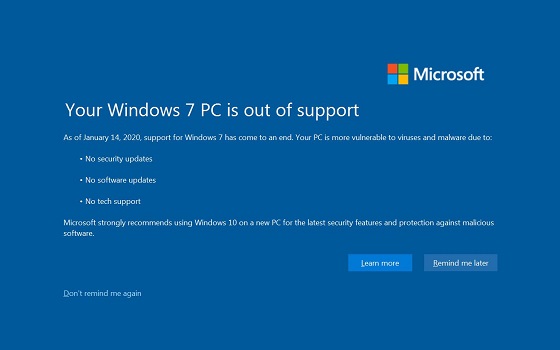 Time is running out for anyone still on Windows 7. Soon there'll be no more security and software updates. Here's what you need to do. The end is near: All support for Windows 7 expires on Jan 14,2020. While the operating system will remain fully functional, no more updates mean you could be working on a computer with major security holes that won't ever be fixed by Microsoft. Considering that the number of vulnerabilities on Windows 7 that could be potential entry points for Trojans or viruses is steadily increasing, you need to have a plan to upgrade to Windows 10. Most private users will be able to get a free update. Windows 10 accepts Windows 7 installation keys – provided you still have that edition installed. You can make the change in three ways: Upgrade the Windows 7 installation to Windows 10, replace it with a brand new Windows 10 installation or install the new operating system parallel to the old one. Whichever you do, you should save your data beforehand and download the free Media Creation Tool from Microsoft. With this, the disk image required for the migration can be downloaded and saved on a USB stick, for example. The advantage of a parallel installation is that all your programs, settings and data will remain untouched. The entire Windows 7 installation is preserved and is only a restart away. If you're upgrading, the experts recommend that you check that all your drivers are up to date beforehand, in particular critical ones such as for the graphics chip or USB interfaces. You also need to uninstall any virus scanner, as Windows 10 brings its own (Defender). Otherwise, the upgrade may fail due to outdated drivers or because the virus scanner blocks it. When you go to upgrade, you need to insert the USB stick or DVD containing the Windows 10 disk image while Windows 7 is running and click on the "Setup.exe" file. If you want a fresh install of Windows 10 that completely replaces Windows 7, you need to restart the computer so it can boot from the USB stick or DVD. Read more: How to switch to Windows 10 for free until Jan 14 2020  At Microsoft’s Ignite 2019 conference, the company announced the general availability date for its new Edge web browser. The Chromium-based Microsoft Edge will be available on January 15 and it appears that the migration will happen in the background through an over-the-air software update. In updated support documentation, Microsoft quietly announced that Chromium-based Edge will be rolled out to Windows 10 computers via a Windows Update. It makes sense since the Chromium-based version of Edge is not tied to Windows or any operating system releases. The document suggests that users will not have the option to keep the old Edge and the new browser would be deployed ‘automatically’ for all systems running Windows 10 version 1803 (April 2018 Update) or newer. “To help our customers become more secure and up-to-date, Microsoft will distribute Microsoft Edge (Chromium-based) through Automatic Updates for Windows 10 RS4 and newer,” the company said. While the consumers will be forced to try the new Edge experience, Microsoft says it will launch a Blocker Toolkit for organizations so administrators can control the installation of the new browser on configurations with automatic Windows Update enabled. Microsoft is hoping to address the bugs and add new extensions to the store ahead of the browser’s general availability in January. Microsoft is inviting developers to update their existing Edge extensions and as well as migrate their other extensions to the new browser. The classic Edge never got a significant number of browser extensions due to its low adoption and Microsoft’s strict policy of manually reviewing each extension. While Microsoft will still review the extensions and the process could be slow, Edge users will be able to install Chrome or Chromium extensions from other marketplaces such as Chrome web store. Chromium-based Edge currently has more than 100 extensions available on its add-ons website, but the store is likely to get many more add-ons ahead of the browser’s general availability in January. Follow this and more on OUR FORUM. |
Latest Articles
|